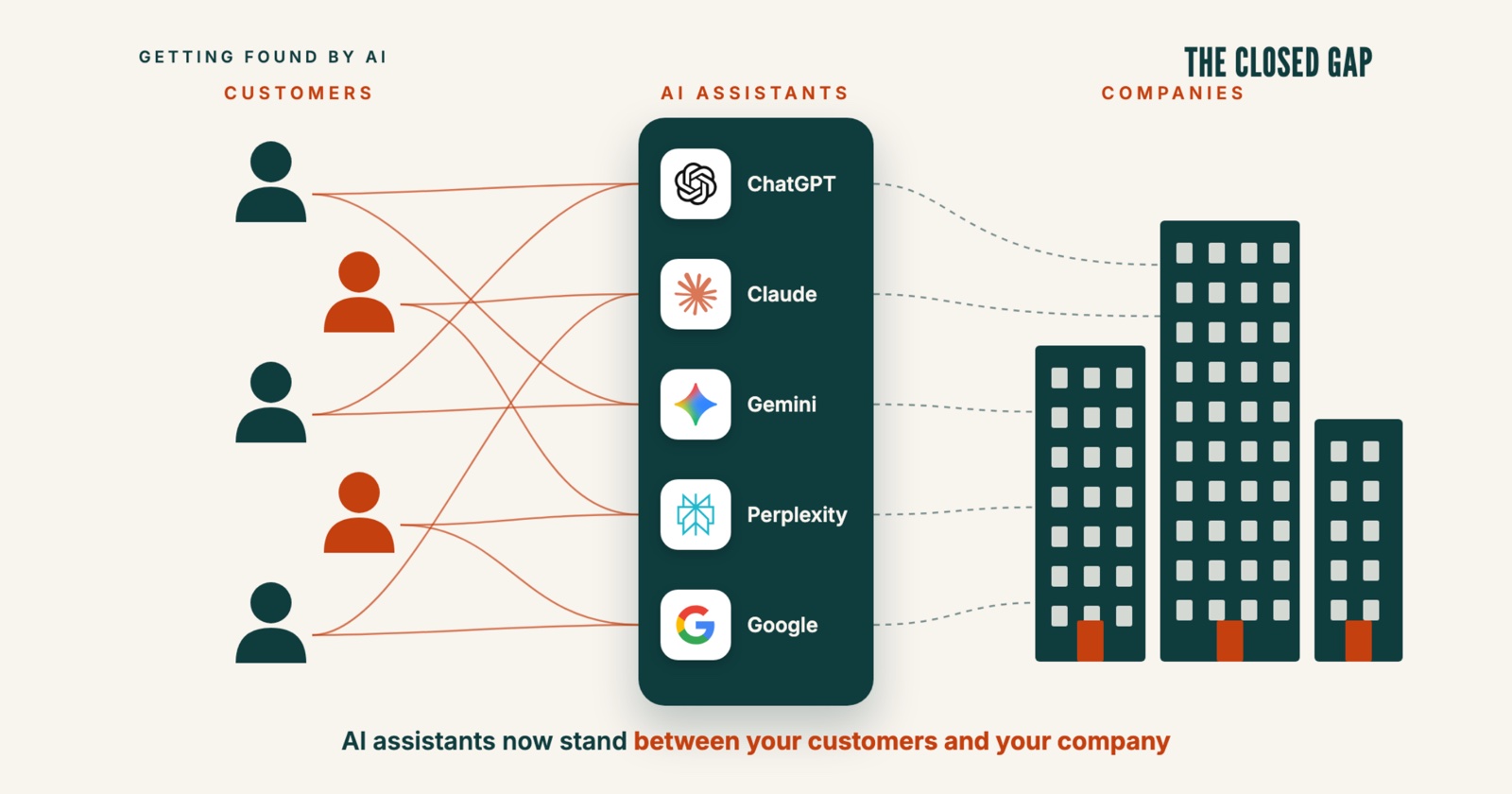
If you lead a company, your next customer may ask ChatGPT, Perplexity or Google for a supplier or a service before visiting any website. The answer is a short list of names and a view on each one. You can find out what these assistants say about your company with 20 questions and a spreadsheet. My estimate: about 2 days for the first check, and about 1 day for each monthly check after that.
Step 1: Measure where you stand with 20 questions your buyers really ask
Write 20 questions the way a buyer would type or say them to an assistant, in full sentences. Use the language your buyers use. If they use several, split the questions, for example 10 in German and 10 in English, and keep the same split every month.
Leave your company name out of 18 of the 20 questions, because a new buyer does not know your name yet. Use 3 types for these 18, for example 10, 4 and 4:
Category questions. Example: "Which IT support companies in Basel work with small law firms?"
Comparison questions, which name the real options a buyer weighs. Example: "Is it better to hire an in-house IT person or an IT support company for a team of 20?"
Problem questions, which describe the problem without naming a type of product. Example: "Our office network keeps failing, what should we do?"
The last 2 questions contain your name, for example: "What do you know about [your company]? Is it a good choice for [the need of your buyer]?" and "How does [your company] compare with [your main competitor]?" Count them separately, because an assistant almost always names you when the question already does.
Good sources for these questions are your sales calls, the first emails new customers send you, and Google Search Console, Google's free dashboard that shows which searches bring people to your website. A search such as "it support basel law firm" becomes the question "Which IT support company in Basel is good for a law firm?"
Ask all 20 questions in ChatGPT, Perplexity and Google's AI Mode, the chat-style search on google.com. If AI Mode is not available in your country, use Google's normal search and read the AI Overview at the top. Use a private browser window and stay logged out, so your own history does not change the answer. Ask each question 3 times, and start a new chat for every run, because in the same chat the earlier answer shapes the next one. The same question often gets a different answer on the next run, and 3 runs show you which names come back each time.
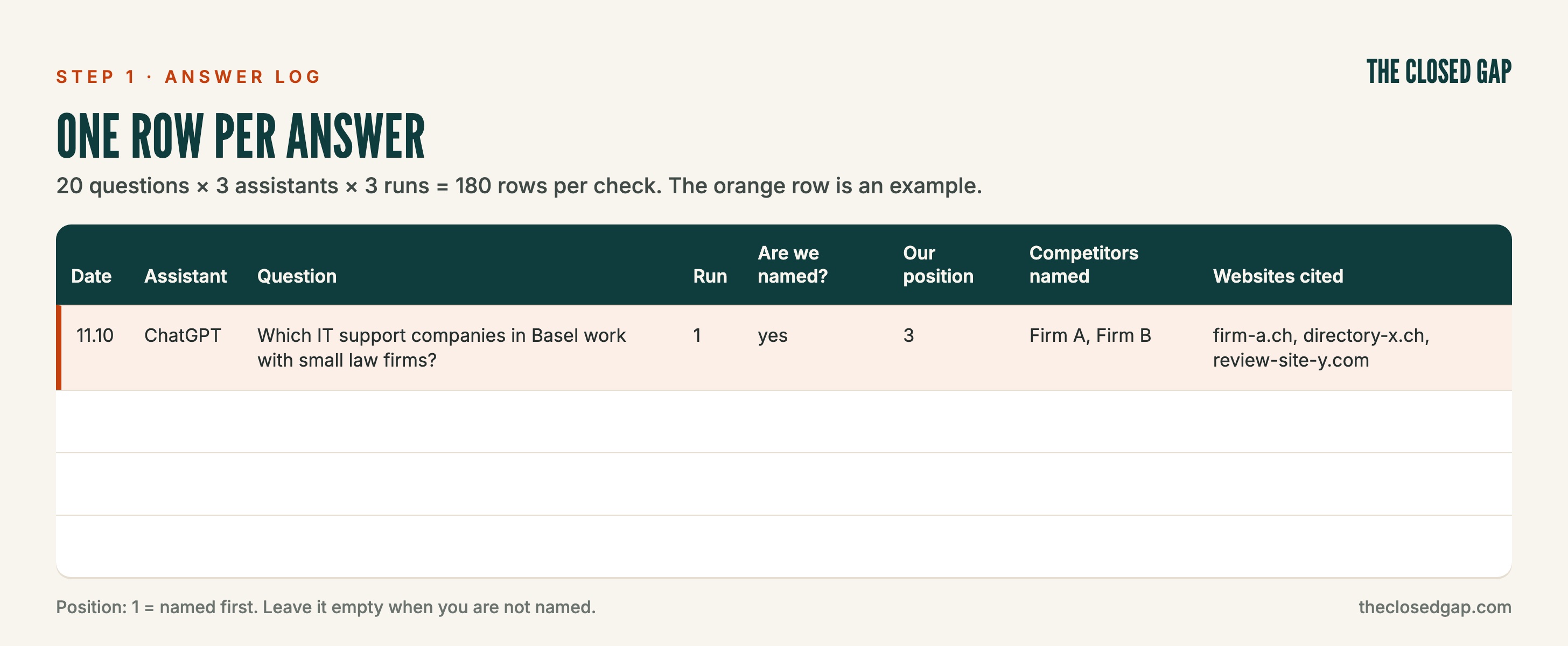
Copy this table into a spreadsheet and fill one row per answer:
You can copy both tables from a free Google Sheet, which also calculates the 4 numbers below for you: Copy the Google Sheet
Your position is your place in the answer: 1 if you are named first, 2 if second, and so on. Leave it empty when you are not named. Copy the cited website addresses exactly. They show you which websites the assistants use for your market, and you need them in steps 2 and 4.
Your table turns into 4 numbers that show your reach among new buyers
Use only the 18 questions without your name for these numbers, so they show your reach among buyers who do not know you yet. Your list of companies is you plus every competitor that appears in the answers.
Visibility: in how many answers are you named? Answers that name you ÷ all answers.
Share of voice: of all the company names in the answers, how many are yours? Your mentions ÷ the mentions of every company on your list.
Citation rate: how often is your own website a source? Answers that cite your website ÷ all answers.
Average position: when you are named, how high up? The average of your positions; 1 is best.
Here is a worked example with invented numbers. 18 questions, asked in 3 assistants 3 times each, give 18 × 3 × 3 = 162 answers. You are named in 16 of them, so your visibility is 16 ÷ 162 = about 10%. All companies together are named 400 times, about 2 to 3 names per answer, and 16 of those mentions are you, so your share of voice is 16 ÷ 400 = 4%. Your website is cited in 8 answers, so your citation rate is 8 ÷ 162 = about 5%. Your 16 positions add up to 40, so your average position is 40 ÷ 16 = 2.5.
Calculate the same 4 numbers for the competitor named most often. Your numbers mean most next to theirs.
Step 2: Read the verdict on your company
Now read the answers to your 2 questions with your name: 2 questions × 3 assistants × 3 runs = 18 answers, already in your table. Read them as a customer would, and fill a second table, one row per claim or fact:
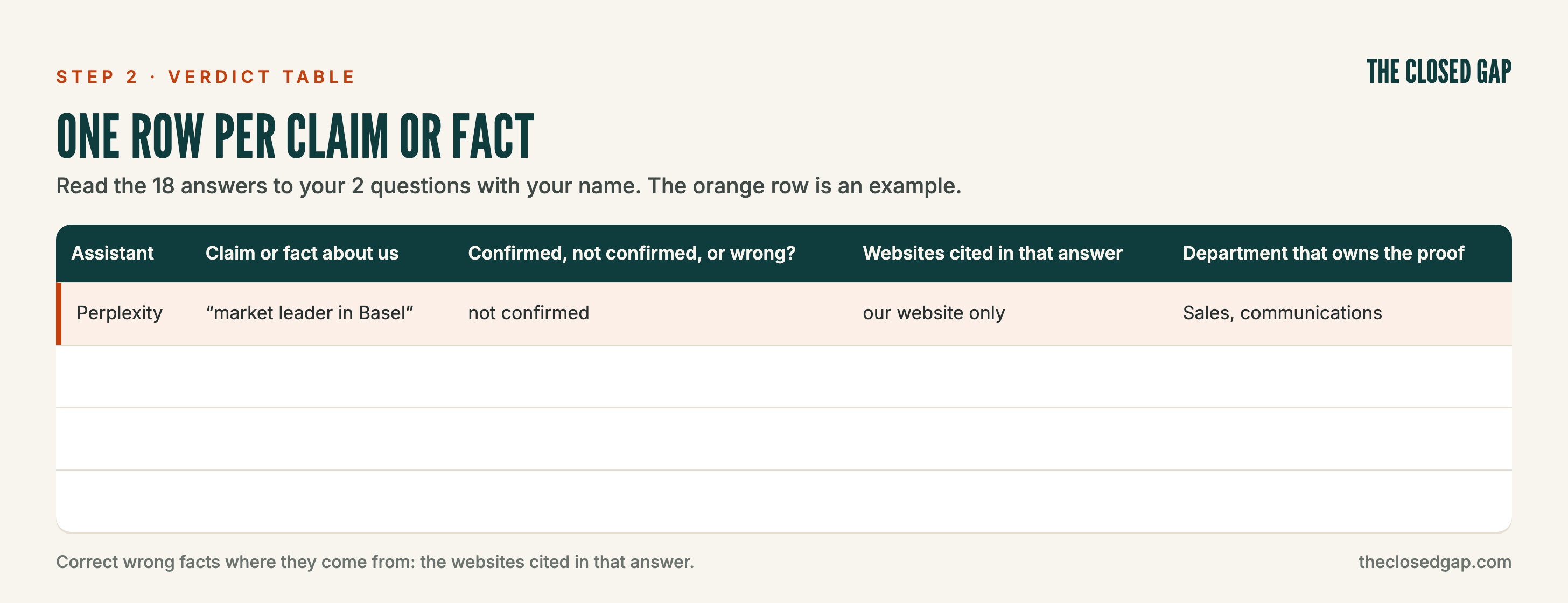
Look for claims the assistant could not confirm, for example "premium" or "market leader" with no proof it could find. Look for facts that are wrong or old, such as a former address, an old price or a product you no longer sell. Note the reasons it gives for preferring a competitor.
The "Websites cited" column shows you where a wrong fact comes from. Correct it there: on your own website first, then in directories, listings and your Google Business Profile. Keep figures and prices current, because an assistant that finds an old price may prefer a newer source. For every claim the assistant could not confirm, the department in the last column has to publish the proof somewhere the assistant can read it.
Your 2 tables show which of 3 cases you are in, and each case has its own next step
As a rule of thumb, compare your 4 numbers with those of the competitor named most often, and read your second table.
If the results are good, the content is right: keep doing what works, with more focus on the weak areas. In this case, go to step 3 for the questions where you are weakest, and set up step 5 to count what comes in.
If the assistants do not see the company, I would stop spending on the look of the website and on ads. I would put that money into content and into presence on other websites: the lists of the top 10 or top 3 providers, comparison pages and reviews. The goal is to be named on the questions that do not contain your name. In this case, start with step 4, then step 3.
In the third case, the assistants name the company and doubt it: your second table is full of claims they could not confirm, old facts or reasons to prefer a competitor. In this case, fix the proof and the facts from step 2 first, then go to step 3.
Step 3: Make your key pages easy to quote
Start with the 5 pages that answer your category and problem questions: usually your main service pages, your prices, your case studies and your "about" page.
Under each heading, answer one buyer question in the first sentence. A reader, human or AI, should get the answer without reading further.
Add your own data with named sources: numbers of customers, projects, test results, certificates.
Show a named author with credentials, and the date of the last update.
Use the same company name, address and one-sentence description on every page and every profile.
Google's own guide to its AI features says that you do not need to write in a special way for AI search, and that no new AI text files and no special structured data are needed. The points above are ordinary good writing for human buyers. They also give an assistant a clear sentence and clear proof to quote.
Step 4: Get onto the pages the assistants already cite
Go back to the "Websites cited" column from step 1. Leave out your own website and the websites of your competitors. Count how often each of the other websites appears, and take the 3 that appear most. For each one, decide what kind of page it is:
For a list or directory of providers, ask to be included, with correct facts.
For a review site, ask your satisfied customers for a review there.
For a comparison article, send the author your current facts and offer an interview.
For trade press, offer a story with your own data.
If a list or a review is cited for your questions and leaves you out, getting included is often faster than getting your own page cited.
Social platforms count too. In data published in September 2026 by an AI visibility tracking company, LinkedIn was the most cited social platform for software and B2B tech questions in ChatGPT, in 6.2% of answers, and in Perplexity, in 15.6% of answers. In Google's AI Overviews, YouTube was the most cited, in 37.3% of answers. Your own "Websites cited" column is the better guide for your market.
Step 5: Check access, and count the customers who come through AI
Ask your web agency 4 questions:
Does our robots.txt file block any AI crawler? Robots.txt is a small file on your website that tells the programs of search engines and AI companies what they may read. The important ones are GPTBot and OAI-SearchBot (OpenAI), ClaudeBot and Claude-SearchBot (Anthropic), PerplexityBot (Perplexity), Googlebot (Google) and Bingbot (Microsoft).
Does our hosting or firewall block AI crawlers? Some providers offer this as a setting, so check it next to robots.txt.
Does the text of our key pages appear without JavaScript? In December 2024, the hosting company Vercel found that the crawlers of OpenAI, Anthropic and Perplexity do not run JavaScript, so text that appears only after scripts load may never be read by them. Google's crawler is the exception.
Is our sitemap, the list of all our pages, submitted in Google Search Console and in Bing Webmaster Tools, Microsoft's free equivalent?
Then start counting. Ask your agency to create a group for AI visits in Google Analytics: visits from chatgpt.com, perplexity.ai, gemini.google.com, claude.ai and copilot.microsoft.com. Visits from Google's AI Overviews count as normal Google visits, and some AI visits arrive with no source at all, so this number is a minimum. Add "an AI assistant" as an answer to "How did you find us?" in your contact form and in your first sales call. These answers come straight from your buyers.
Repeat steps 1 and 2 every month, and judge only changes that last
Run steps 1 and 2 again once a month with the same 20 questions and the same setup, because a number only means something against the same questions. Then read the AI visits in Google Analytics and the answers to "How did you find us?". Treat a change as real only when it holds for 2 monthly checks in a row; one month's move can come from the normal variation between runs.
The numbers are a sample, so use them to compare and not to measure market share
20 questions are a small sample of what buyers really ask. Logged-out answers can differ from what a buyer sees in a personal account, especially when the buyer's assistant has memory switched on. Assistants can change how they search at any time. Use the numbers to compare your company with itself, month by month, and with the competitors in the same answers.